Detailed worked example with concrete prompts, observable outcomes, and the limits of the example.
What you're watching
YOU rows are the human's turns; AGENT rows are the agent's; the italic lines are workshop commentary. Every prompt is quoted verbatim from a prior session's history, the screenshots are the actual captures from those sessions, and the agent turns summarize what those sessions did — nothing here is invented. The full prompt library and setup guide live on the section guide.
Beat 1 · The drop
You
Hit the CleanShot hotkey on the running app. Draw ONE fat red arrow at the element in question. Drag the capture from the annotate overlay straight into the agent's prompt.
The whole loop — capture, annotate, drop — takes seconds. Fast enough to use for every UI-shaped prompt.
Agent
The drop renders as an inline marker — [Image #1] in Claude Code and pi. The Codex CLI rewrites the same drag into a file header instead:
# Files mentioned by the user:
## capture.png:
~/screenshots/capture.png
Either way the model gets the pixels. The rendering difference only matters when you script prompts.
You
Projector day, so drag-and-drop is awkward — grab the newest capture's path from the shell instead:
dir="${CLEANSHOT_DIR:-$HOME/screenshots}"
ls -t "$dir" | head -3
printf '%s' "$dir/$(ls -t "$dir" | head -1)" | pbcopy
echo "newest capture path copied — paste it into your agent prompt"
A pasted file path works because the image is data, not decoration — an agent with filesystem access reads the actual pixels.
Beat 2 · The annotation IS the prompt
You
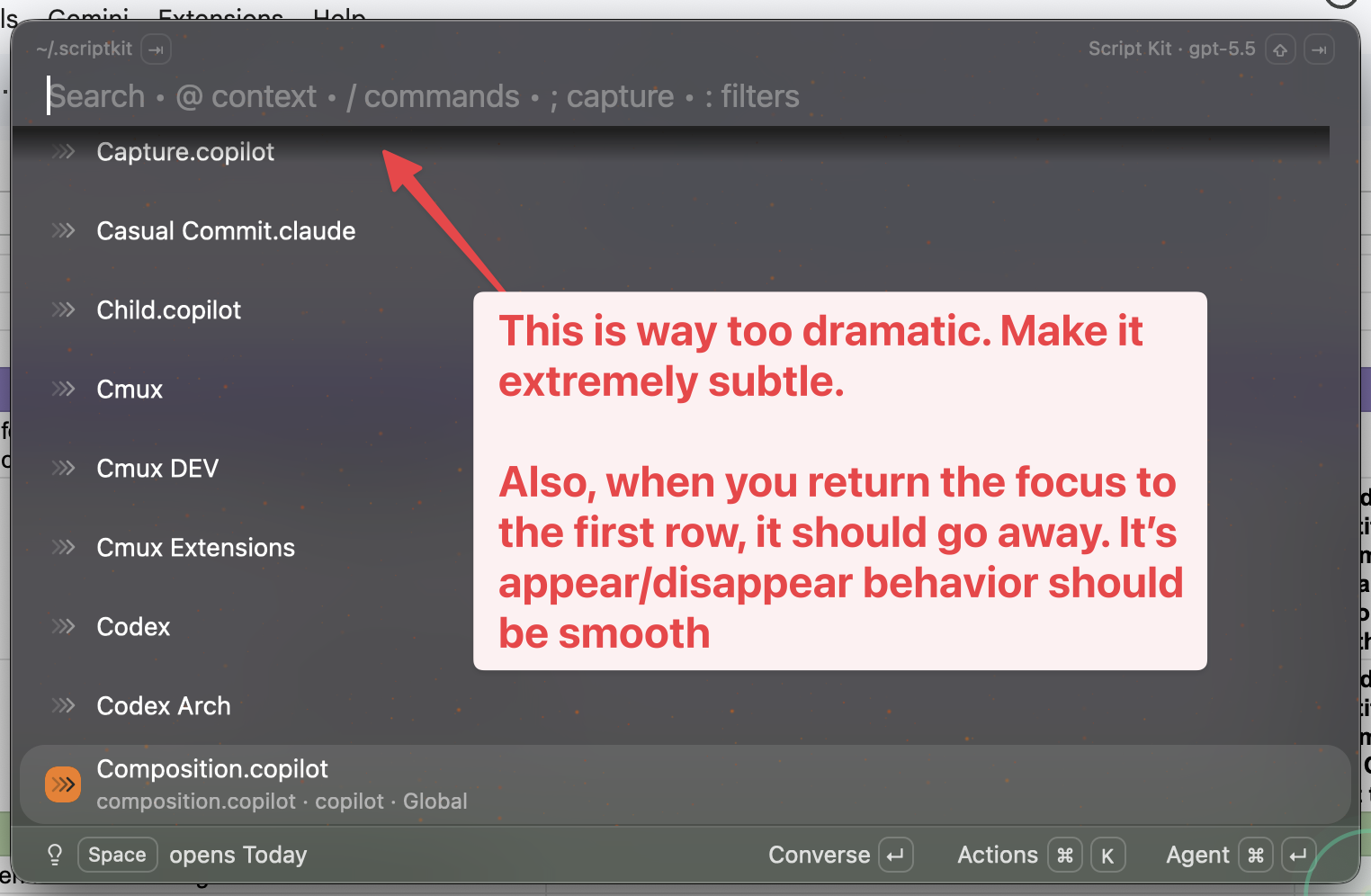
CleanShot's text tool, used mid-session: the feedback is typed directly on the capture.
[Image #1] Do what the annotation says.
The arrow marks the element; the callout typed on the image carries the whole instruction. The typed prompt shrinks to five words.
Agent
Everything it needs is in the pixels: the arrowed top row is the subject, and the callout is the instruction — too dramatic, make it extremely subtle, make it go away when focus returns to the first row, smooth the appear/disappear.
When the annotation and the intent collapse into one image, there is nothing left to describe in prose.
Beat 3 · The picture is the spec
A different prior session, a different repo: a workspace sidebar that needed a design pass. No paragraph described the sidebar.
You
[Image #1] Ask /oracle-packx for some suggestions on how we can make the
workspace sidebar much more "at a glance" useful then create a /web-choices
from its suggestions and implement my choices once they're ready
Verbatim, and the whole prompt. /oracle-packx and /web-choices are the author's local slash commands — the portable shape is on the section guide.
Agent
Consulted for suggestions with the screenshot as the baseline, came back with five design directions, rendered them as a visual picker, and implemented the saved choices.
The baseline screenshot carried the entire spec. The picture answered every "what does it look like now?" question before it was asked.
Beat 4 · The bug report that shipped as a PR
The finale, from a prior session on a desktop launcher app. The bug: while typing in the main menu input, focus sometimes jumps off the first item down to a lower row. Exactly the kind of bug prose describes badly.
You
Capture the failure state. One fat arrow at the row that wrongly holds selection.
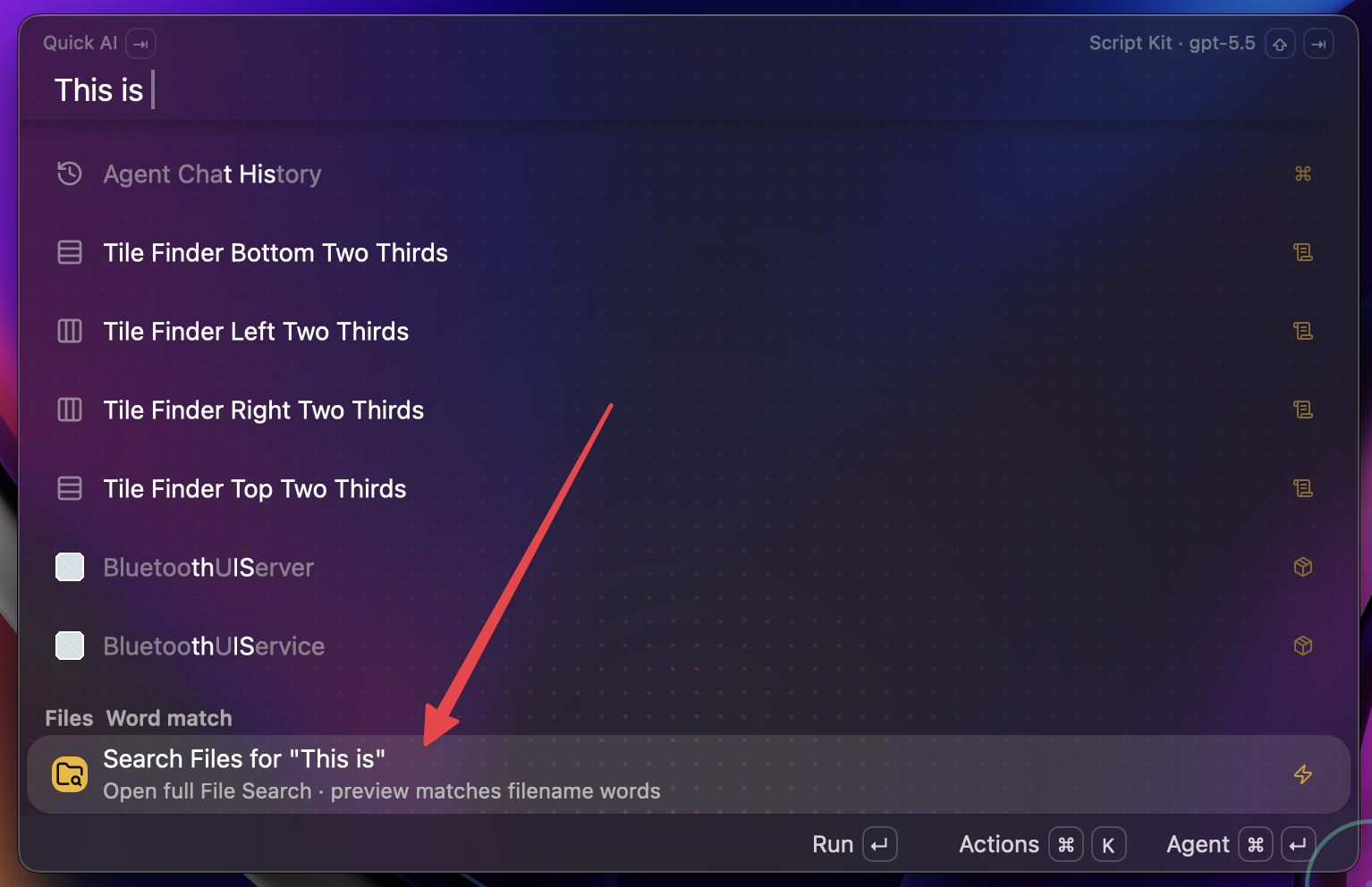
The screenshot that was the bug report.
/goal [Image #1] --- ensure that as you're typing in the main menu input, that
the first item in the list always stays focused. Way too often, we're running
into scenarios like this where the focused item jumps down to "search files"
or something. /oracle-packx then implement
That was the entire bug report. "Scenarios like this" points at the picture: the arrow answers which element, the sentence answers what you want, and the slash commands chain the plan.
Agent
One conversation, no follow-up prompts: investigated the focus handling, consulted an external model with the screenshot in the context bundle, implemented the fix, verified it live in the running app, committed, and opened a pull request.
The fix shipped as a PR from a one-sentence prompt because the screenshot carried the context.
Take the prompt home
The money artifact above uses the author's local slash commands. This is the portable version — the same prompt with those commands removed, ready to paste into any image-capable agent:
[Image #1] --- ensure that as you're typing in the main menu input, the first
item in the list always stays focused. Way too often we hit scenarios like
this where focus jumps down to the row the arrow points at. Investigate,
implement, verify in the running app.
All five reusable prompt shapes, the setup steps, and the caveats are on the section guide. To teach your agent to read annotated screenshots this way, hand it agent.md.